Custom 3D printing without modelling
Just snap a sketch.
Filamo takes care of the rest.
Need a custom part but don’t know how to model it? A hand-drawn sketch becomes a 3D model, a print-ready STL, a technical drawing and a price quote. Here’s how one hole in a bathroom wall got fixed.
7-day demo with every feature and 5 conversions, no credit card.
How it works
 Problem
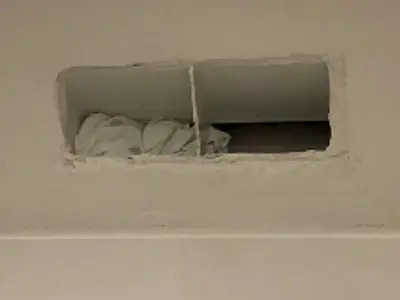
A hole in the wall
You can’t buy a grille that fits, and you can’t do 3D modelling.
 Step 1
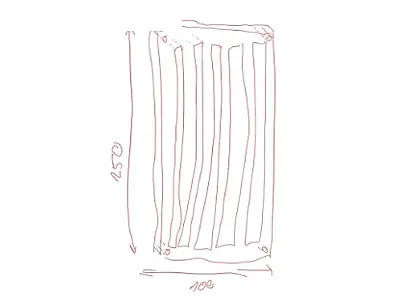
Snap the sketch
A freehand drawing with the main dimensions is enough.
 Step 2
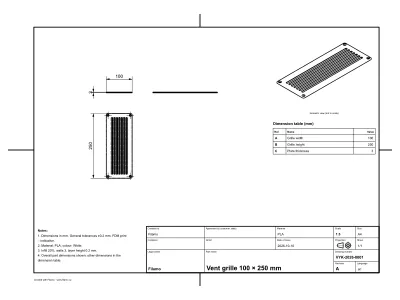
Filamo creates the model, STL and drawing
The sketch turns into a model, an STL file for printing and a dimensioned technical drawing. Something off? Adjust the size or shape right in the app.
 Step 3
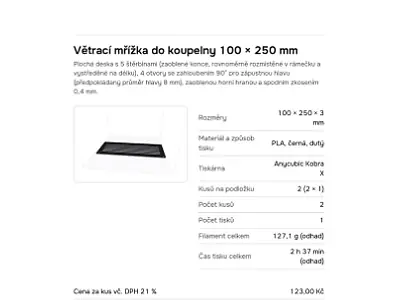
A quote in one click
Material, printer, number of pieces, estimated filament, time and price. Here: 2 pieces for CZK 246.
 Step 4
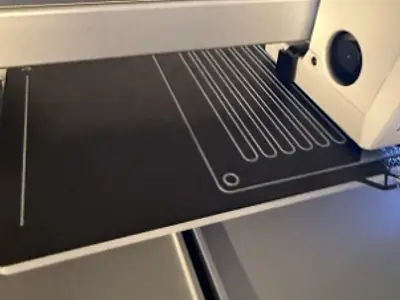
Printing
The finished STL goes to the slicer and straight to the printer. No manual modelling.
 Step 5
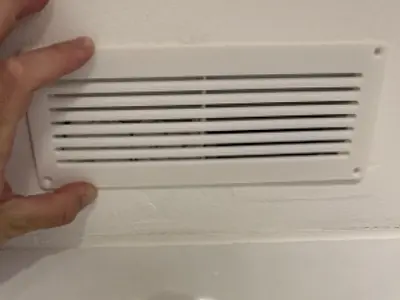
Done – and it fits
The 100 × 250 mm grille, made exactly from the sketch, covers the hole in the wall.
For companies: from drawing to production
Digitise technical drawings
Upload a PDF or a scan and the AI reads the dimensions from every view, the threads and the manufacturing data in the title block.
Create a 3D model for your production
Once you confirm the dimensions, you get a model for 3D printing and an exact STEP for CNC and CAD (0.01 mm tolerance, circular interpolation).
Spare parts without a drawing
From photos or an iPhone 3D scan (LiDAR; coming soon – Premium and demo) with measured dimensions.
Every plan reads drawings and photos; iPhone scanning (Filamo Sken app – coming soon) is part of Premium – and of the demo. Premium Plus adds export for manufacturing – STEP and the .scad source code.
Premium Plus for companiesWhat else Filamo can do
Shapes from an image
Turns a logo or drawing into a keyring, sign or relief, even in two colours – without AI and free of charge.
Part templates
Boxes, holders, caps and other common parts – just enter the dimensions.
STL and 3MF import
Upload a finished model, including colours from your slicer, and get usage and price.
Multicolour printing
Exports coloured parts and filament changes to 3MF for PrusaSlicer, OrcaSlicer and Bambu Studio, or as a ready-made Kobra X project.
Bed layout
Works out how many pieces fit on the bed and arranges them – you can also move and rotate them by hand.
Jobs
Jobs with statuses, deadlines and automatic deduction of the filament used.
Filament stock
Spools, remaining amounts and stock value, with barcode check-in.
Workshop
Printers and print queues in one clear overview.
Quotes and drawing approval
PDF quotes and a technical drawing your customer approves via a link.
Jobs, stock, workshop, quotes are part of the Premium plan – and of the demo; iPhone (LiDAR) scanning is coming soon. Full pricing
Frequently asked questions
Do I need to know 3D modelling?
No. A freehand sketch with the main dimensions, or a photo of the part, is enough. Filamo builds the model, and you can then adjust its size and shape with sliders or a single sentence.
Which printers is it for?
For common FDM printers – the catalogue includes Prusa, Bambu Lab, Anycubic, Creality, Elegoo and QIDI. The output is STL or 3MF for PrusaSlicer, OrcaSlicer, Bambu Studio and Anycubic Slicer Next.
What if the AI misreads a dimension?
No model is created until you confirm the dimensions. Filamo shows what it read from the sketch, asks about anything unclear, and you can correct every value. A failed conversion is not charged.
How much does it cost?
Loading…
Is Filamo also for companies and machining?
Yes. Filamo reads technical drawings from PDF and photos of parts in every plan – dimensions from every view, threads and the manufacturing data in the title block (material, tolerances, surface roughness). Scanning a part with an iPhone LiDAR (Filamo Sken app – coming soon) is part of the Premium plan and you can try it in the demo. For manufacturing there is the Premium Plus plan: an exact STEP AP242 and AP214 for CNC and CAD (arcs as true circles, 0.01 mm tolerance), the model’s .scad source code and a higher daily AI limit. We invoice your company with its company ID and VAT ID.
Where is my data stored?
Projects and files are stored in the EU (Frankfurt). For recognition, the sketch is sent to Anthropic’s Claude model, which by default does not use the inputs for training. We use no analytics and no advertising cookies.
Does it work on an iPad?
Yes. Filamo is built primarily for the iPad and Apple Pencil: draw the sketch in Notes, for example, or take a photo of a piece of paper. It also works on phones and computers and can be added to the home screen as an app.
Got an idea on paper? Snap it.
Try it with your own sketch
Upload a sketch or a technical drawing
A technical drawing as PDF, a photo of a paper sketch, an export from Notes on iPad, or paste an image from the clipboard. Dimensions in millimetres.
You can also upload a PDF drawing – with several pages you pick the page with the part.
AI reads the shape and dimensions from the sketch. Before anything is generated, you will see and confirm every dimension.
Converting to a model needs an account – and get a 7-day demo with everything, free.
Already have a model?
Upload an STL or 3MF and we will calculate material use and price without AI. When you are signed in, the model is saved to your library.
Shape from an image – no AI
Keyring, cookie cutter, fridge magnet, plaque, figurine on a stand or a lithophane from a photo. Everything is calculated on your device, the image is not uploaded anywhere and no conversion is used.
Part templates – no AI
Box with lid, drawer organiser, hook, cable holder, hole cap, spacer, washer. Enter the dimensions and the model is ready straight away – no conversion used.